One workspace. Your whole business. Powered by AI.
Bring billing, cashflow, people, payroll, purchases, and documents together. Work visually on the canvas, or ask the assistant to find records and help you take the next step.
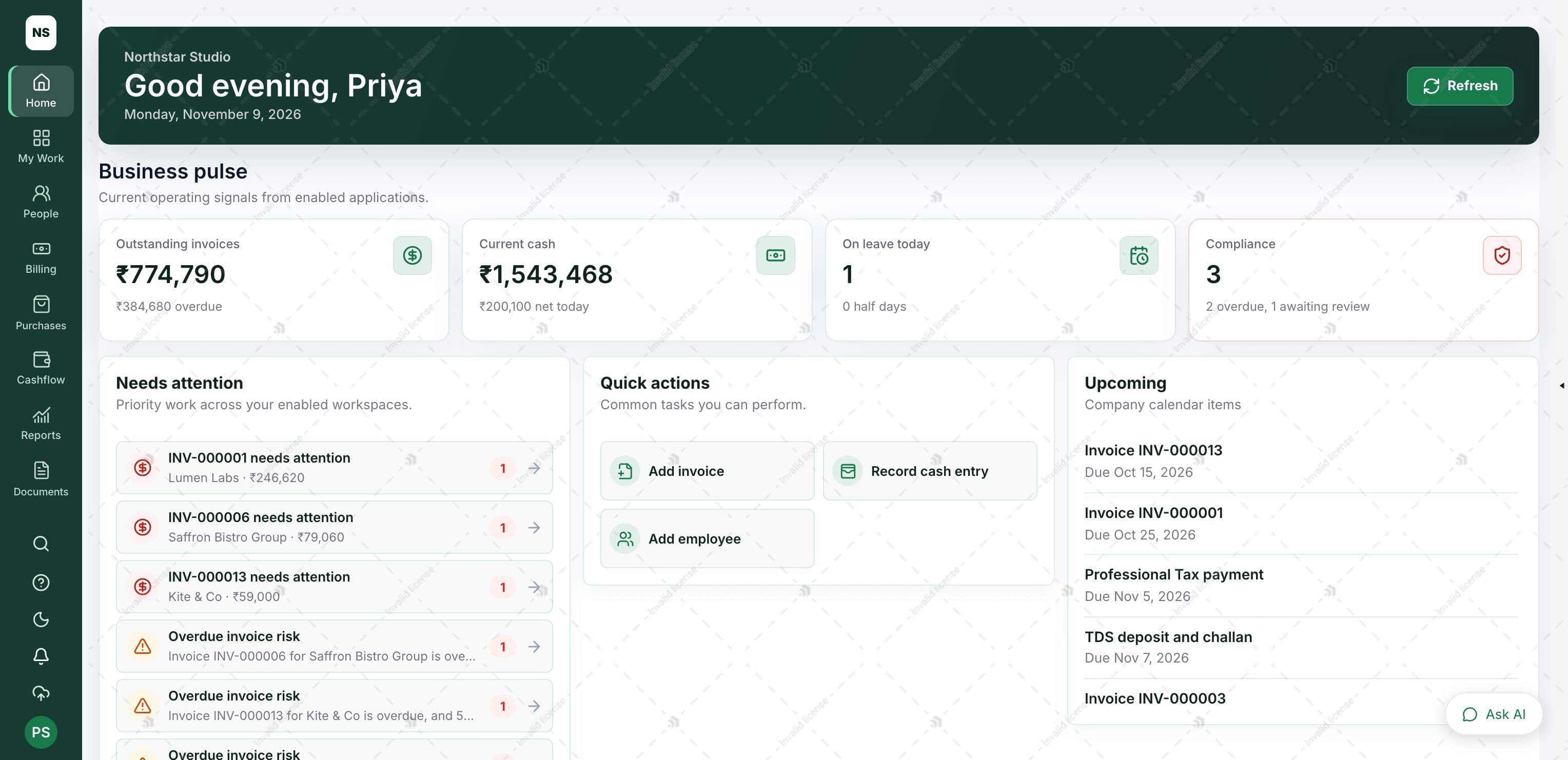
Nine business areas. One shared set of records.
Customers, people, suppliers and money live in the same workspace, so every module — and the assistant — works from the same facts.
Billing & revenue
Customers, products and services, invoices, recurring billing, credit notes, payments and collections in one flow.
Cash flow & treasury
Accounts, cash entries, budgets, forecasts, scenarios, risk alerts, reconciliation and financing.
People & HR
Employees and contractors with profiles, assets, onboarding and exit, letters and policies.
Time & payroll
Attendance, regularization, leave, holidays, work schedules and payroll runs with payslips.
Purchases & spend
Suppliers, bills, expenses and reimbursements with approvals and payments.
Documents & compliance
A shared document library, contracts and compliance obligations with evidence and reviews.
My workspace
Each person sees their own tasks, leave, attendance, expenses, payslips and documents.
Reports & insights
Dashboards, reports and exports across modules, with the records behind every number.
Admin & security
Organizations, teams, roles and permissions, approval policies, data management and branding.
A record is more than a long form.
A customer, an employee, or an invoice comes with connected details. The canvas gives each section its own space, so you can see the relationship and focus on one thing at a time.
Start with the whole picture
See the record and its sections as connected nodes.
Open just what you need
Select a node to focus on its fields and details.
Keep your place
Return to the overview and move to the next section with the context intact.
Designed around real business workflows, not isolated screens.
Billing that connects customers, invoices, payments, and collections
turns billing into a daily operating system. Teams can manage customer accounts, recurring services, invoice activity, payment status, balances, and follow-ups without switching tools.
- Customer account visibility
- Invoice and payment tracking
- Collection-ready follow-ups
People operations built around employees, attendance, leave, and payroll
HR and payroll inputs stay connected to the actual workforce workflow. Employee data, attendance signals, leave decisions, documents, and payroll preparation live together.
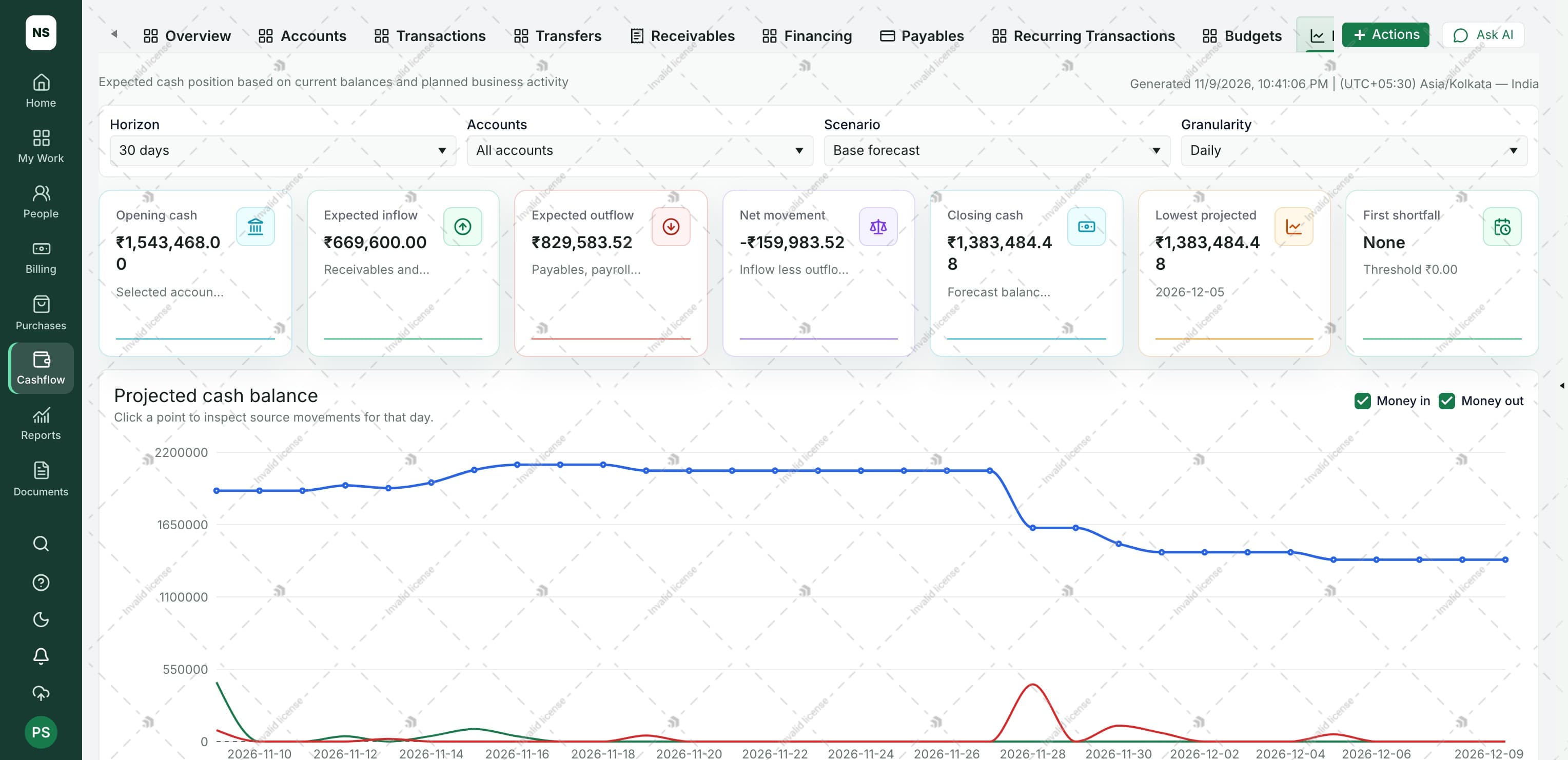
See cash coming and going before it happens.
Receivables, supplier bills, recurring payments and payroll feed one forecast. Spot a shortfall weeks ahead, then decide what to chase or delay.
- A day-by-day projected balance for the next 30 days
- Planned payroll, rent and supplier payments
- Bank statements reconciled against your records
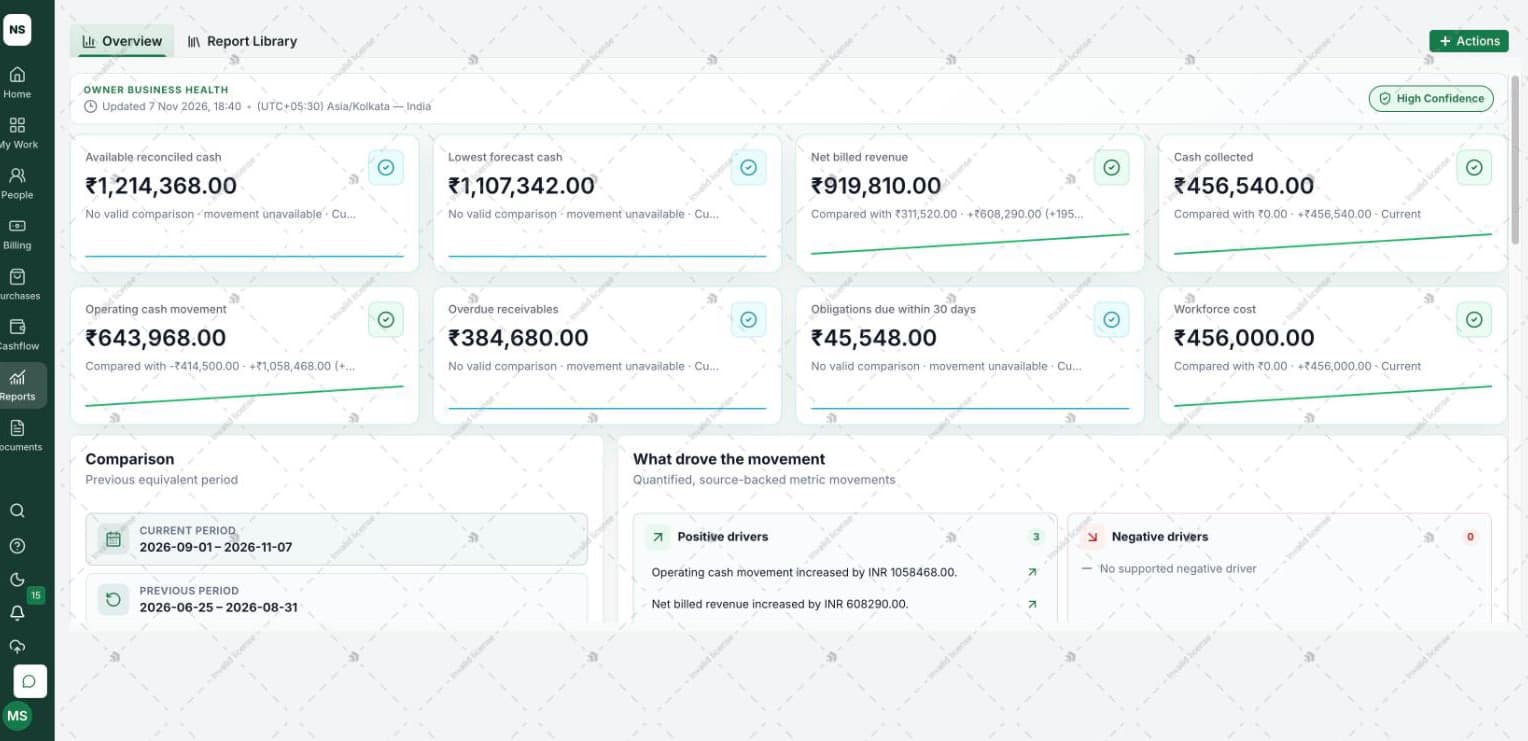
Know how the business is doing without building a spreadsheet.
Owner-level reports tie billing, cash, people cost and compliance together for the period you choose, with every number linked to the records behind it.
- Business health on one page
- Revenue, cash and workforce cost side by side
- Export when you need to share
Follow the work from start to finish.
Keep every part of the customer relationship in view.
Customer information, invoice details, payment activity, and collections belong to the same business story. Work with each record and its related information.
- 01Customer
Account and contact details
Northstar Studio - 02Invoice
Services, dates, and amounts
- 03Send
Share the invoice with your customer
- 04Payment
Record incoming payments
- 05Collection
Follow up on what remains
From a sentence to a finished task.
Ask a question, find a record, prepare a draft, or move through a business workflow in a conversation. Available actions follow the same permissions and business rules as the rest of your workspace.
Ask your business
Who owes us the most? What did we spend on travel? Answers come from your own records.
Act across modules
Approve leave, record payments, send invoices or update records — one at a time or in bulk.
Turn documents into records
Drop in a bill, receipt or CV and the fields are filled in for you to review.
Find anything instantly
Open any customer, invoice or employee by name, from anywhere in the product.
Write and translate
Draft reminders, letters and descriptions in the tone and language you need.
Safe by design
Confirms before changing anything, never repeats a completed action, and keeps the history.
Available actions follow your permissions and enabled modules.
- Understood: approve pending leave requests
- Found 3 pending requests you can approve
- ARAsha RaoAnnual · 3 days
- BCBen ColeSick · 1 day
- CWChen WuAnnual · 2 days
- Checked balances, overlaps and your approval rights
Built for the work you do every day.
Products, invoices, cash flow, people and payroll — real screens from a fictional sample company, opened as connected records.
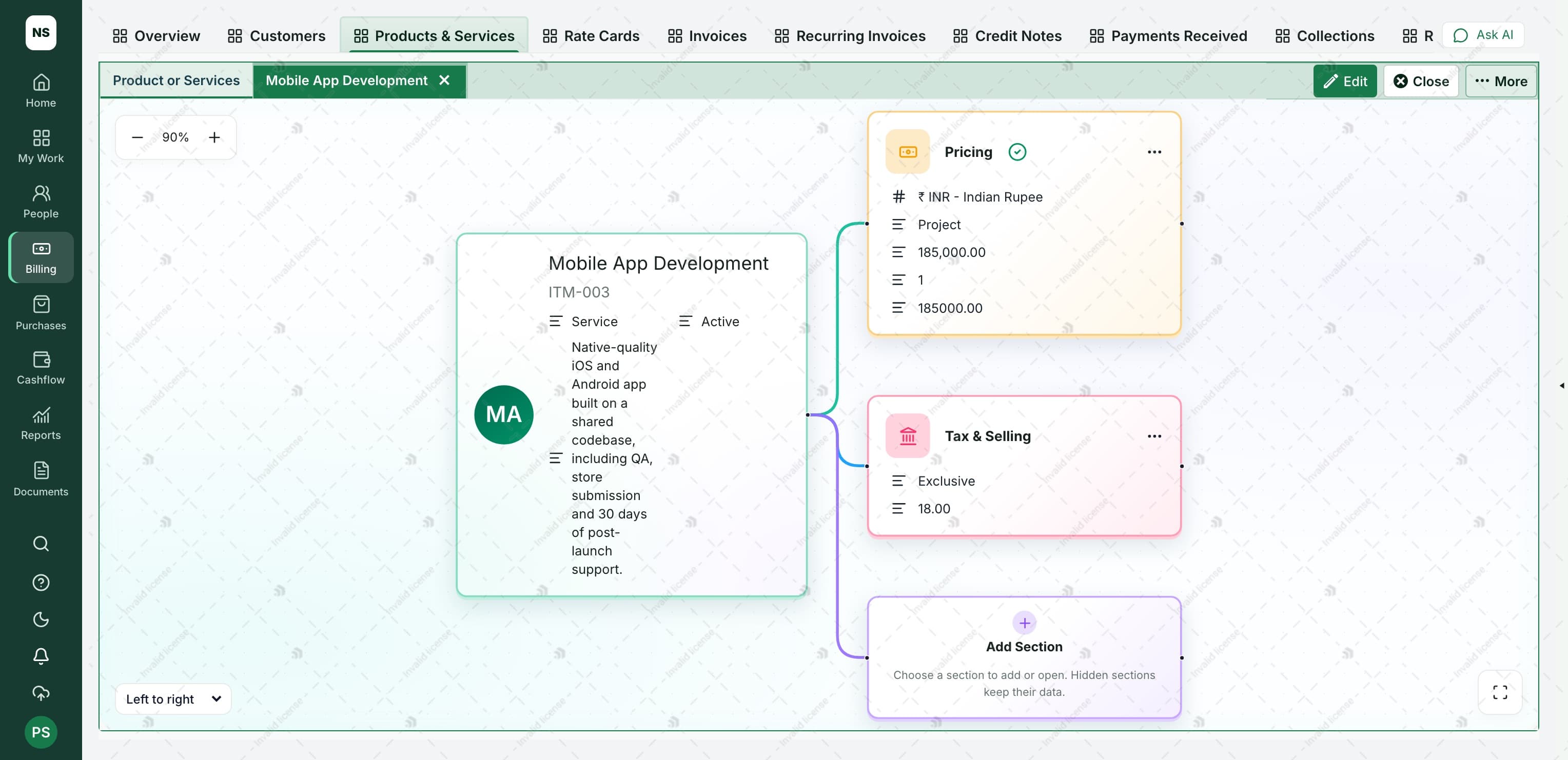
Products and services keep their pricing and tax together, ready to add to an invoice.
Connected work. Appropriate access.
Keep a shared way of working while controlling who can see and change the details.
Roles & permissions
Control access to modules and actions according to the responsibilities of each role.
Organization context
Work in the right organization with its own enabled applications, settings, and team access.
Activity & accountability
Use record activity and audit visibility to understand changes and follow the work.
| Module | Owner | Finance | HR | Employee |
|---|---|---|---|---|
| Billing & revenue | Full access | Full access | No access | No access |
| People & HR | Full access | No access | Full access | Own records |
| Time & payroll | Full access | View only | Full access | Own records |
| Cash flow & treasury | Full access | Full access | No access | No access |
| Reports & insights | Full access | Full access | View only | No access |
Start free. Upgrade when you grow.
Every organisation starts on the Free plan. Plus adds automation, advanced workflows and higher limits.
Loading plans…
Before you get started.
brings billing, people operations, purchases, spend, cashflow, documents, and reporting into a connected workspace. The modules you can use depend on your organization's enabled applications and your access.
Growing businesses that want their finance, people, and operations teams to work with connected information. Administrators configure the organization and the applications their teams need.
Each record has connected section nodes. Select a node to work with its details, then return to the overview. It gives detailed records a consistent layout without requiring every field to be open at once.
Ask questions about your business, find and open records, fill forms from text or documents, and have it carry out tasks such as approving leave, recording payments or sending invoices. It always shows what it will do and waits for your confirmation, and it can only do what your role allows.
Yes. Organization roles and permissions control access to applications, records, and actions. The assistant also operates within the access available to the signed-in user.
Yes. The screens on this page use a fictional sample company, so you can see how billing, people, payroll and cash flow fit together before you set up your own workspace.
Yes. The Free plan covers core billing, HR and cash flow for small teams, with no payment details needed. Plus adds automation, advanced workflows and higher limits; the pricing page lists the current limits.
Bring your whole business into one AI-ready workspace.
Start on the free plan with no payment details, and upgrade when your team grows.